Top Wireless Gaming Earbuds 2025: Best Picks

Serious mobile gamers know that quality audio makes all the difference. The right pair of gaming earbuds transforms your portable gaming sessions on devices like the Steam Deck OLED, Nintendo Switch, and other handheld PCs, delivering immersive sound without the weight of traditional headsets. Perfect for travel or home use, these lightweight options keep you focused on your game without neck strain.
Our Top Gaming Earbud Recommendations
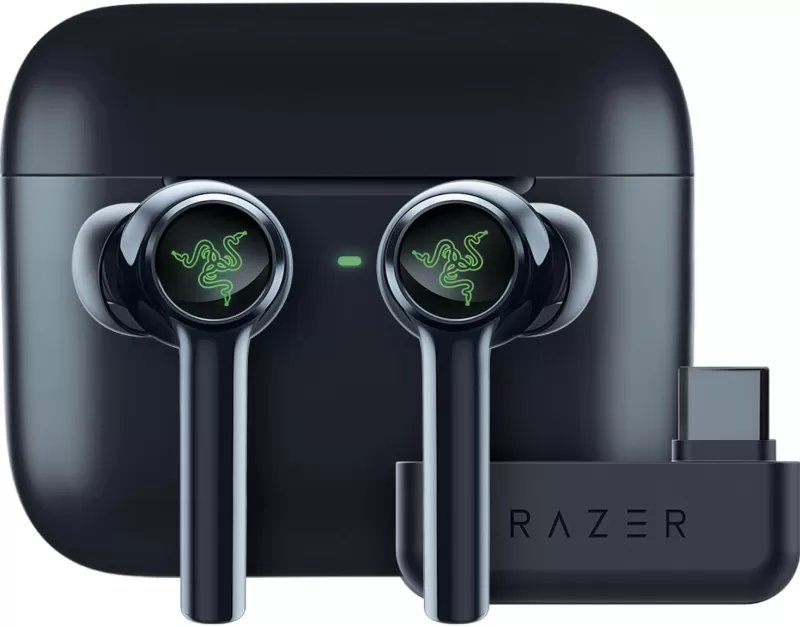
Razer Hammerhead Pro HyperSpeed
Flagship wireless earbuds with dual connectivity and THX-certified audio
View at Amazon

Logitech G FITS
Custom-molded fit with LIGHTSPEED wireless technology
https://www.amazon.com" class="buy-button">View at Amazon

Gaming Earbuds Buying Guide
Key Considerations
- Connectivity: Choose between wired reliability or wireless freedom (2.4GHz dongle for lower latency than Bluetooth)
- Comfort: Look for multiple ear tip sizes and lightweight designs for extended sessions
- Sound Quality: Prioritize clear directional audio for competitive gaming advantage
- Microphone: Built-in mics vary in quality - crucial for team communication
- Battery Life: Wireless models typically offer 4-12 hours per charge (with case extending playtime)
Best Uses For Gaming Earbuds
While traditional headsets still dominate desktop gaming, earbuds shine for:
- Portable gaming systems (Switch, Steam Deck, etc.)
- Travel and commuting
- Hot weather gaming when over-ear headphones feel stifling
- Hybrid use for music, calls, and casual gaming
Frequently Asked Questions
Are gaming earbuds worth it?
Absolutely. Modern gaming earbuds rival traditional headsets in sound quality while offering superior portability. Many models now feature low-latency wireless connections competitive with gaming headsets.
Can I use regular earbuds for gaming?
While possible, dedicated gaming earbuds typically offer better microphones, optimized sound profiles for games, and lower-latency connections - especially important for competitive play.
How do gaming earbuds connect to consoles?
Most connect via:
- 3.5mm jack (universal wired option)
- 2.4GHz USB dongles (for PS5/PC with minimal latency)
- Bluetooth (Nintendo Switch compatible)
Note: Xbox Series X/S requires proprietary wireless for full functionality.
Latest Articles
Trending Games










Top News

![Roblox Forsaken Characters Tier List [UPDATED] (2025)](https://images.dyk8.com/uploads/18/17380116246797f3e8a8a39.jpg)





Latest Games